---
title: Ways to Spend Employee Benefits | Benefits Guide | SideUp
description: Discover all the ways employees can use their flexible benefits, from student loan repayment and childcare to wellness, commuting, meals, and financial wellbeing, with SideUp.
---
[Skip to main content](https://sideup.com/how-to-spend-your-benefits#main-content)
[](https://sideup.com/?hsLang=en)
- Solutions
Pre-tax Benefits
IRS-compliant, pre-tax benefits for core needs.
- [Student Loan & Tuition Smarter education funding](https://sideup.com/student-loan-repayment-benefits?hsLang=en)
- [Commuter Pre-tax transit & parking](https://sideup.com/commuting?hsLang=en)
- [HRA Health Reimbursement Arrangement](https://sideup.com/hra?hsLang=en)
- [Family Care Real support for caregivers](https://sideup.com/family-care?hsLang=en)
Lifestyle Spending Accounts
Flexible, post-tax benefits for modern life.
- [Wellness & Fitness Gym, mental health & wellbeing](https://sideup.com/wellness-fitness?hsLang=en)
- [Work From Home Home office & remote setup](https://sideup.com/work-from-home?hsLang=en)
- [Food Meals, groceries & nutrition](https://sideup.com/food?hsLang=en)
- [Utilities & Essential Bills Internet, phone & household bills](https://sideup.com/utilities-essentials-bills?hsLang=en)
- Platform
For Employers
- [Manage Benefits Streamline your benefits administration](https://sideup.com/how-to-manage-benefits?hsLang=en)
- [Integrations Connect with your favourite tools](https://sideup.com/integrations?hsLang=en)
- [Trust Security, Privacy and Compliance](https://sideup.com/trust?hsLang=en)
For Employees
- [How to spend benefits Discover how to use your SideUp card](https://hi.sideup.com/how-to-spend-your-benefits)
- [Stayconomics](https://sideup.com/stayconomics?hsLang=en)
Learn with Stayconomics
Explore the ideas, research, and strategies behind workplaces people choose to stay in.
[Blog Data-backed, no-fluff articles on retention, benefits, and the future of work.](https://hi.sideup.com/stayconomics) [Podcast On Youtube and Spotify with the leaders who are actually figuring it out.](https://hi.sideup.com/stayconomics/podcast) [Newsletter The best of what's happening in HR and employee retention, curated, concise, and worth your Monday morning.](https://hi.sideup.com/stayconomics/tag/newsletter) [Events & Webinars Real experts, real questions, real takeaways you can use before the week is over.](https://hi.sideup.com/stayconomics/events-webinars) [Explore by Topics Retention, benefits, HR tech, financial wellness, and more, organized by what you need.](https://hi.sideup.com/stayconomics/topics-1)
- Company
Know more about us
Who we are, who we work with and how to reach us.
[Partnership Grow with us, as a partner, reseller or local business](https://sideup.com/partnership?hsLang=en) About us The story and the people behind SideUp Brandbook Our logo, colours and voice, ready to use [Contact us Questions, ideas or a demo? Say hello](https://sideup.com/contact-us?hsLang=en)
- Log in
- [Employee](https://app.sideup.com)
- [Business Platform](https://admin.sideup.com)
[Book a demo](https://meetings-eu1.hubspot.com/lana-leles/demo)
- Solutions
- Pre-tax Benefits
- [Student Loan & Tuition](https://sideup.com/student-loan-repayment-benefits?hsLang=en)
- [Commuter](https://sideup.com/commuting?hsLang=en)
- [HRA](https://sideup.com/hra?hsLang=en)
- [Family Care](https://sideup.com/family-care?hsLang=en)
- Lifestyle Spending Accounts
- [Wellness & Fitness](https://sideup.com/wellness-fitness?hsLang=en)
- [Work From Home](https://sideup.com/work-from-home?hsLang=en)
- [Food](https://sideup.com/food?hsLang=en)
- [Utilities & Essential Bills](https://sideup.com/utilities-essentials-bills?hsLang=en)
- Platform
- For Employers
- [Manage Benefits](https://sideup.com/how-to-manage-benefits?hsLang=en)
- [Integrations](https://sideup.com/integrations?hsLang=en)
- [Trust](https://sideup.com/trust?hsLang=en)
- For Employees
- [How to spend benefits](https://hi.sideup.com/how-to-spend-your-benefits)
- [Stayconomics](https://sideup.com/stayconomics?hsLang=en)
- Learn with Stayconomics
- [Blog](https://hi.sideup.com/stayconomics)
- [Podcast](https://hi.sideup.com/stayconomics/podcast)
- [Newsletter](https://hi.sideup.com/stayconomics/tag/newsletter)
- [Events & Webinars](https://hi.sideup.com/stayconomics/events-webinars)
- [Explore by Topics](https://hi.sideup.com/stayconomics/topics-1)
- Company
- Know more about us
- [Partnership](https://sideup.com/partnership?hsLang=en)
- About us
- Brandbook
- [Contact us](https://sideup.com/contact-us?hsLang=en)
- Log in
- [Employee](https://app.sideup.com)
- [Business Platform](https://admin.sideup.com)
- [Book a demo](https://meetings-eu1.hubspot.com/lana-leles/demo)
Ways to spend benefits
# Spend benefits with freedom
Pay with your SideUp card, spend at local Marketplace businesses, or upload a receipt and get reimbursed. No paper forms, and no chasing your employer to get paid back.
[Book a 15-min demo](https://meetings-eu1.hubspot.com/lana-leles/demo)
Three ways to spend
## Use your benefits the way that fits the moment
One account, three ways to use it. Your employer chooses which budgets are turned on, so what you can spend on depends on your plan.

1
Pay with your card
Tap in store or pay online with your SideUp card. Each budget is set up by your employer for specific kinds of spending, so the card simply works where it should.

2
Shop local with the Marketplace
Spend your budget at independent businesses in your neighborhood and unlock discounts and freebies that only SideUp members get.
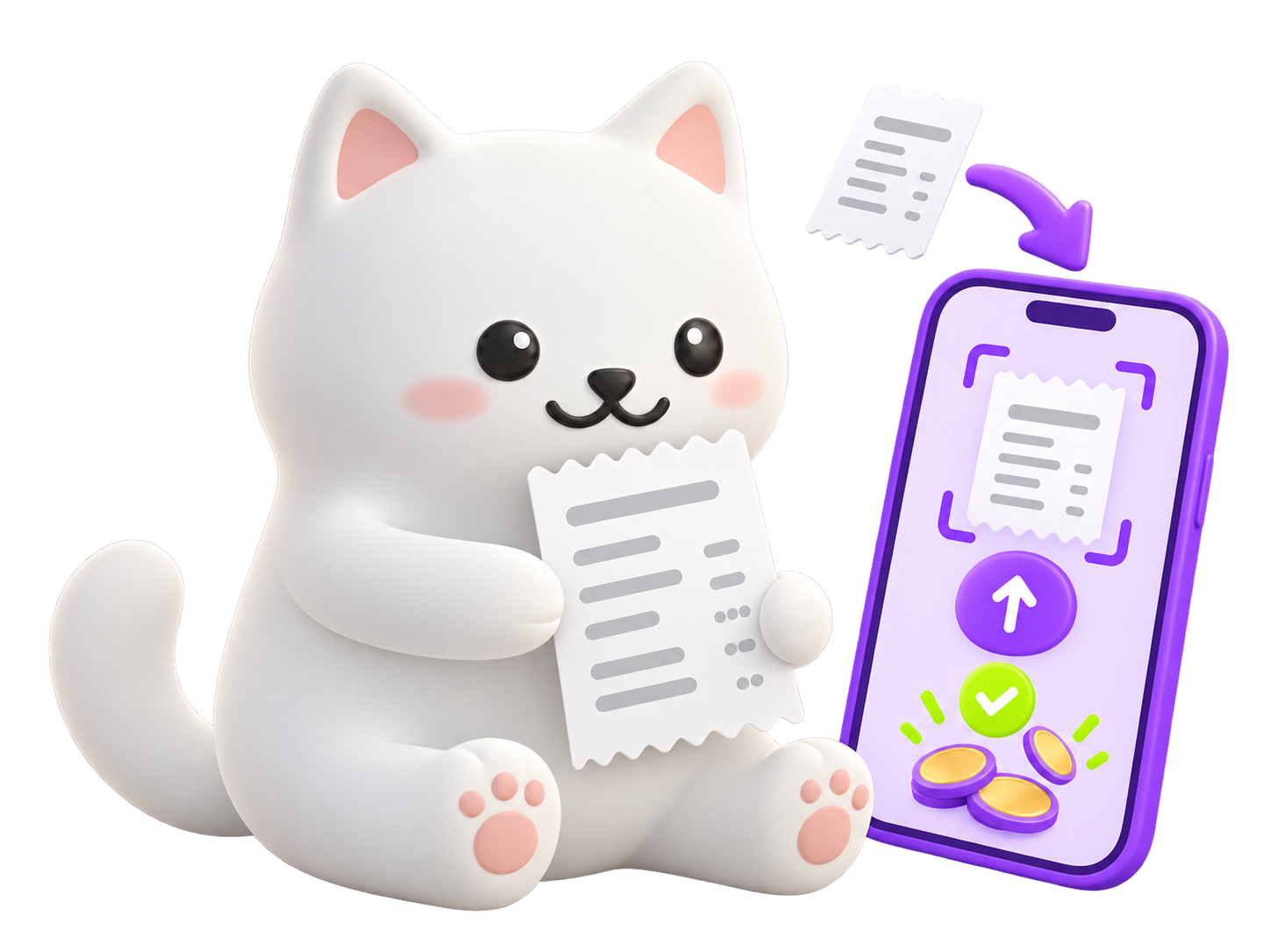
3
Get reimbursed with a receipt
Paid for something yourself? Upload the receipt in the app, your employer approves it, and you get paid back.
This side up ↑
## No forms. No chasing. Just tap.
VISA
VISA
ALEX MORGAN
Illustrative example
A card that works where your budget does, and nowhere it shouldn't
Your phone is your wallet. Add the card and tap away
Local favorites that throw in a little extra
Benefits, right side up.
Two kinds of budget
## Two kinds of budget. One card.
Your employer can turn on pre-tax benefits, Lifestyle Spending Accounts, or both. Each one has its own balance, so you always know where you stand.
Pre-tax benefits
Each follows specific IRS rules
Every pre-tax benefit has its own budget and limits, tracked for you automatically. Your employer chooses which are turned on:
- Student Loan & Tuition
- Commuter
- HRA
- Family Care
Lifestyle Spending Accounts
Flexible budgets for everyday life
Spend on what matters to you. Lifestyle Spending Account funds are taxable and are reported by your employer.
- Wellness & Fitness
- Work From Home
- Food
- Utilities & Essential Bills
A summary, not tax advice. Check your plan with a tax advisor.
The SideUp app
## One card. One app. Every benefit.
Everything your employer gives you lives in one place. Check your balance, see how to use each benefit and pay, all from your phone. It takes seconds, not forms.
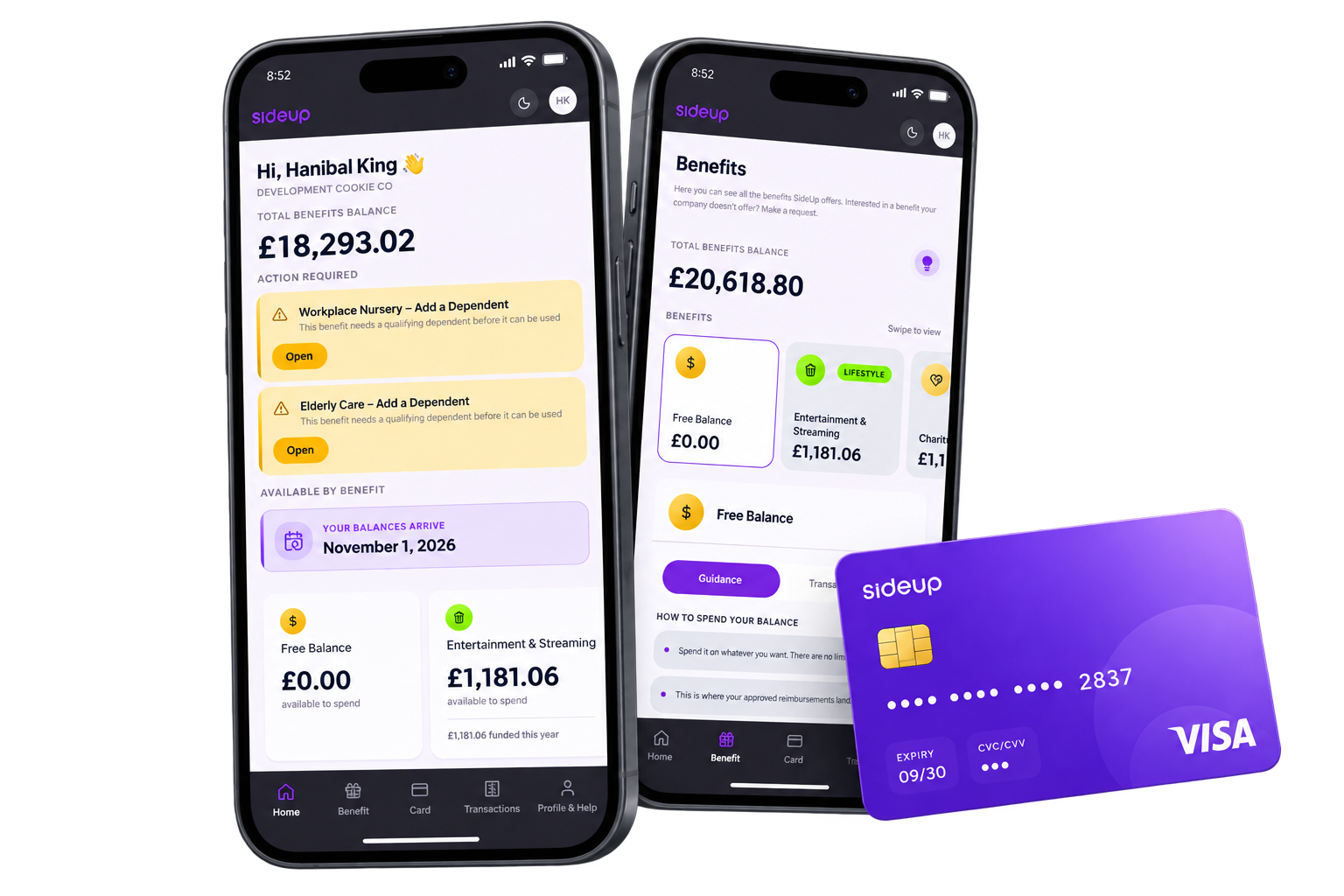
Home
Your total balance at a glance, plus a heads-up whenever something needs your action.
Benefits
Swipe through every budget and see exactly how to spend each one.
Card
Track your card from order to your door, then start paying.
Transactions
Every payment in one clear list, so you always know where your money went.
Easy
No forms and no spreadsheets. If you can use a banking app, you can use SideUp.
Fast
Pay on the spot with your card, or upload a receipt in a few taps.
All in one
One card and one platform for every benefit your employer offers.
The SideUp card
## One card for everything. In your pocket and on your phone.
Your SideUp Visa card works across every budget your employer turns on. Add it to your phone's wallet and pay with a tap.
✓
Add it to your phone's wallet in a few taps.
✓
Track your physical card from order to delivery in the app.
✓
One card for every budget, with no switching between apps.
✓
Powered by Stripe and issued by Celtic Bank.
Wallet ready
Issued by Celtic Bank
Physical cardPhone walletOnline payments
SideUp Visa® Commercial cards are powered by Stripe and issued by Celtic Bank. Stripe Issuing balances are provided in the US by Stripe Payments Company, licensed money transmitter, with funds held at Stripe's bank partners, Members FDIC.
SideUp Marketplace
## Every dollar goes further. And stays local.
Spend your benefit budget at independent local businesses in the SideUp Marketplace and unlock discounts and freebies that only members get.
[List your business](mailto:partnerships@sideup.com?subject=List%20my%20business)[Nominate a local favorite](mailto:partnerships@sideup.com?subject=Nominate%20a%20local%20favorite)
Member-only discounts
Exclusive offers from businesses in the Marketplace, on top of your budget.
Freebies from local favorites
Little extras that independent businesses give to SideUp members.
Know a great local spot?
Nominate it and we will invite it to join.
Stay in the loop
## Updates and help, where you already are
We keep you posted about your budgets, and there are quick ways to get an answer when you need one.
App notifications
Push notifications about your balance, new budgets and reimbursements.
Email
The same updates in your inbox, so nothing slips past you.
SideUp assistant
Ask a quick question in the app. For anything else, our team is at help@sideup.com.
FAQ
## Frequently Asked Questions
Everything you need to know about spending your SideUp benefits.
How do I spend my benefits?
There are three ways. Pay with your SideUp card, spend at local businesses in the SideUp Marketplace, or pay another way and upload the receipt to get reimbursed.
Where can I use my card?
Your employer sets up your budgets, and each one is meant for specific kinds of spending. If you're not sure what a budget covers, ask your HR team or email help@sideup.com.
Can I add my card to my phone's wallet?
Yes. Add your SideUp card to your phone's wallet and pay with a tap.
How do I get reimbursed for something I paid for myself?
Upload the receipt in the app. Your employer approves it, and you get paid back.
What's the difference between pre-tax benefits and Lifestyle Spending Accounts?
Pre-tax benefits each follow specific IRS rules and have their own limits. Lifestyle Spending Accounts are flexible budgets for everyday life, and they are taxable. Your employer chooses which ones are turned on for you.
Will I pay tax on my benefits?
It depends on the benefit. Pre-tax benefits follow specific IRS rules, and Lifestyle Spending Account funds are taxable and reported by your employer. A summary, not tax advice. Check your plan with a tax advisor.
What is the SideUp Marketplace?
It's a network of independent local businesses where you can spend your benefit budget and unlock discounts and freebies that only SideUp members get. Know a business that should be in it? Email partnerships@sideup.com.
How will I hear about my balance and updates?
We send app push notifications and emails about your balance, new budgets and reimbursements. You can also ask the SideUp assistant a quick question in the app.
Who do I contact if I need help?
Email our Customer Success team at help@sideup.com.
## Bring SideUp to your team
### Ready to modernize your benefits?
Give your people one card and one app for every benefit, and take the admin off your plate. Book a demo and see SideUp in action.
[](https://sideup.com?hsLang=en)
Benefits that work for everyone.
### Products
- [Student Loan & Tuition](https://sideup.com/student-loan-repayment-benefits?hsLang=en)
- [Wellness & Fitness](https://sideup.com/wellness-fitness?hsLang=en)
- [Work from Home](https://sideup.com/work-from-home?hsLang=en)
- [Family Care](https://sideup.com/family-care?hsLang=en)
- [Food](https://sideup.com/food?hsLang=en)
- [Utilities & Essential Bills](https://sideup.com/utilities-essentials-bills?hsLang=en)
- [HRA](https://sideup.com/hra?hsLang=en)
- [Recognition](https://sideup.com/recognition?hsLang=en)
### Platform
- [Manage Benefits](https://sideup.com/how-to-manage-benefits?hsLang=en)
- [Integrations](https://sideup.com/integrations?hsLang=en)
- [Trust](https://sideup.com/trust?hsLang=en)
- [Ways to spend benefits](https://sideup.com/how-to-spend-your-benefits)
### Privacy
- [Privacy Policy](https://sideup.com/privacy-policy?hsLang=en)
- [Terms & Conditions](https://sideup.com/terms-conditions?hsLang=en)
### Log in
- [Business Platform](https://admin.sideup.com)
- [Employee Portal](https://app.sideup.com)
[Contact us](https://sideup.com/contact-us?hsLang=en)
SideUp Visa® Commercial cards are powered by Stripe and issued by Celtic Bank. Stripe Issuing balances are provided in the US by Stripe Payments Company, licensed money transmitter, with funds held at Stripe’s bank partners, Members FDIC. 919 North Market Street, suite 950 – Wilmington – DE - 19801
© 2026 SideUp. All rights reserved.
Book a demo
```json
{
"@context" : "https://schema.org",
"@type" : "FAQPage",
"mainEntity" : [ {
"@type" : "Question",
"acceptedAnswer" : {
"@type" : "Answer",
"text" : "There are three ways. Pay with your SideUp card, spend at local businesses in the SideUp Marketplace, or pay another way and upload the receipt to get reimbursed."
},
"name" : "How do I spend my benefits?"
}, {
"@type" : "Question",
"acceptedAnswer" : {
"@type" : "Answer",
"text" : "Your employer sets up your budgets, and each one is meant for specific kinds of spending. If you're not sure what a budget covers, ask your HR team or email help@sideup.com."
},
"name" : "Where can I use my card?"
}, {
"@type" : "Question",
"acceptedAnswer" : {
"@type" : "Answer",
"text" : "Yes. Add your SideUp card to your phone's wallet and pay with a tap."
},
"name" : "Can I add my card to my phone's wallet?"
}, {
"@type" : "Question",
"acceptedAnswer" : {
"@type" : "Answer",
"text" : "Upload the receipt in the app. Your employer approves it, and you get paid back."
},
"name" : "How do I get reimbursed for something I paid for myself?"
}, {
"@type" : "Question",
"acceptedAnswer" : {
"@type" : "Answer",
"text" : "Pre-tax benefits each follow specific IRS rules and have their own limits. Lifestyle Spending Accounts are flexible budgets for everyday life, and they are taxable. Your employer chooses which ones are turned on for you."
},
"name" : "What's the difference between pre-tax benefits and Lifestyle Spending Accounts?"
}, {
"@type" : "Question",
"acceptedAnswer" : {
"@type" : "Answer",
"text" : "It depends on the benefit. Pre-tax benefits follow specific IRS rules, and Lifestyle Spending Account funds are taxable and reported by your employer. A summary, not tax advice. Check your plan with a tax advisor."
},
"name" : "Will I pay tax on my benefits?"
}, {
"@type" : "Question",
"acceptedAnswer" : {
"@type" : "Answer",
"text" : "It's a network of independent local businesses where you can spend your benefit budget and unlock discounts and freebies that only SideUp members get. Know a business that should be in it? Email partnerships@sideup.com."
},
"name" : "What is the SideUp Marketplace?"
}, {
"@type" : "Question",
"acceptedAnswer" : {
"@type" : "Answer",
"text" : "We send app push notifications and emails about your balance, new budgets and reimbursements. You can also ask the SideUp assistant a quick question in the app."
},
"name" : "How will I hear about my balance and updates?"
}, {
"@type" : "Question",
"acceptedAnswer" : {
"@type" : "Answer",
"text" : "Email our Customer Success team at help@sideup.com."
},
"name" : "Who do I contact if I need help?"
} ]
}
```